Why monday.com Adoption Stalls After 90 Days, and How to Restart It
monday.com rollouts rarely fail at launch; they fade after three months. The six common causes, the warning signs, and a 30-day plan to restart adoption.
Tryve implements CRM and project management solutions for businesses
+32 3 377 78 31 Antwerp - Arnhem - Paris
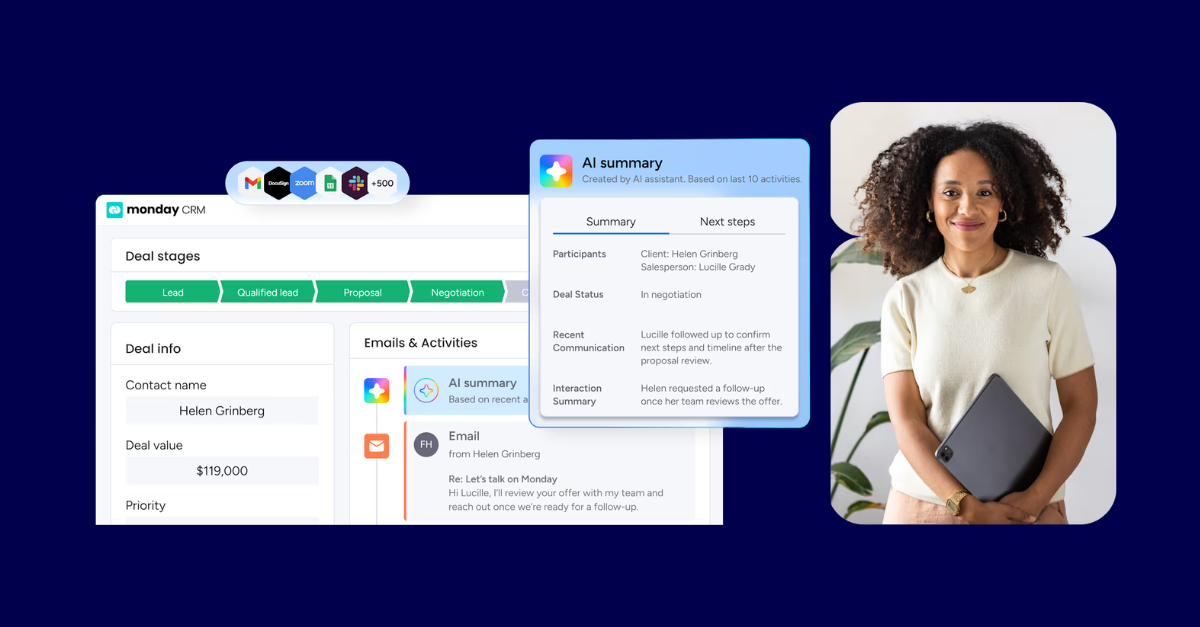
monday.com works as a CRM for many B2B sales teams, but it is not the right fit for every organization. The platform includes a dedicated CRM product with contact management, deal tracking, a visual sales pipeline, email sync, and automations built in. For mid-market teams that already use monday.com for project delivery, it can replace a separate CRM entirely. For teams whose core requirements are native CPQ, complex territory management, or tightly integrated marketing automation, a purpose-built CRM may still go further on those specific fronts.
This guide covers what monday CRM does, where it excels, where it falls short, and who it serves best, so you can make a confident decision before committing. If it looks like the right fit, Tryve’s monday.com consultancy service covers the full implementation.
Want this built for your sales team instead? We implement monday CRM as a certified CRM Specialist partner.
monday.com launched a standalone CRM product, called monday CRM, that lives inside the broader monday.com ecosystem. It is not a separate application: it runs on the same boards, columns, automations, and dashboards as every other monday.com workspace. That shared foundation is both its greatest strength and the thing that most teams misunderstand.
A dedicated CRM like Salesforce or HubSpot ships with a fixed data model (leads, contacts, accounts, opportunities) and a specific workflow baked in. monday CRM ships with sensible defaults for those same objects, but you can reshape everything: rename stages, add custom fields, connect a deal to a project delivery board, or route a lead to a different pipeline based on geography or deal size.
The implication matters: monday.com is a platform, not a finished solution. The configuration is the value. A team that copies the default template and calls it done will have a weaker CRM than a team that maps their actual sales process into the tool and wires up the right automations.
Out of the box, monday CRM gives you a solid set of capabilities:
Contact and account management
Deal and pipeline management
Email integration
Automations
Reporting and dashboards
Getting monday CRM to work well requires deliberate configuration: defining your pipeline stages, connecting boards with mirror columns, building automations for the hand-offs that always get missed, and setting up dashboards tied to the metrics your sales lead actually reviews. The depth of that setup is what separates a CRM that reps use from one that collects dust.
For a step-by-step walkthrough, the monday CRM implementation guide covers every configuration decision. You will also find dedicated guides on building a sales pipeline in monday.com, setting up monday CRM automations, and understanding monday CRM cost before you commit.
Being honest about limitations is part of using any platform well.
No native call logging. monday CRM does not log phone calls natively. You can integrate with tools like Aircall or Twilio, but that is an additional setup step. If your team lives on the phone, check your integration path before committing.
Reporting covers the essentials, with limits for complex analysis. The dashboard widgets cover the sales reporting most SME and mid-market teams need, which is where Tryve focuses. If you require complex funnel analysis, multi-touch attribution across campaigns, or multi-object reporting with advanced filters, you may need to pair it with a dedicated BI tool.
The flexibility cuts both ways. monday.com’s open configuration model means a team can build something genuinely tailored to its process. It also means a team can build something confused, duplicated, and impossible to maintain. Without a clear setup plan and an experienced hand on the configuration, you can end up with more boards than anyone uses and pipelines that tell you nothing useful.
This is the trade-off that matters most in practice. The quality of the setup determines the quality of the CRM. We have seen teams migrate to monday CRM from HubSpot because their HubSpot was a mess, and teams migrate away from monday because their monday setup was a mess. The tool is rarely the problem. The configuration usually is.
monday CRM is a strong fit when:
It is a less natural fit when:
That said, the right fit also depends on implementation quality. A well-configured monday CRM, with the right boards, automations, and dashboards, outperforms a poorly configured Salesforce for most mid-market teams. The platform matters less than the setup.
Tryve has deployed monday CRM for B2B teams across a range of industries. In one recent project, Tryve set up a custom monday.com integration for Carya to connect their CRM data with operational workflows, demonstrating how the platform connects sales activity to delivery without manual hand-offs.
The decision comes down to your sales motion, your existing tool stack, and whether the platform’s flexibility suits how your team actually sells. If monday CRM looks like a fit, the next step is getting the setup right.
Book a free intro call with Tryve to talk through whether monday.com is the right CRM for your team and what a properly designed implementation would look like.
Tryve is a monday.com Platinum Partner. It starts with a free intro call and demo, followed by a proposal based on one of our fixed implementation packs; once you’re on board, a structured discovery phase shapes the build around your actual processes, not a generic template. Senior consultants stay involved through adoption, not just go-live. Book a free intro call.
Tryve is a monday.com platinum partner and helps companies with implementing state-of-the-art project management tools!